Monday, October 04, 2010

Freeware Image Converter - Konvertor

Konvertor is a utility for viewing, converting, organizing graphic, audio, video, text files. It has the following features :
  • Import about 2052 mumtimedia file formats
  • Export about 200 multimedia file formats
  • Multipage TIFF, Animated GIF, Animated ICO support
  • Image IPTC, EXIF metadata support
  • EXIF auto rotation support
  • IPTC/ EXIF / XMP/ GPS editing
  • Resize, rotate, crop support
  • Lossless rotate crop (jpeg) support
  • Adjust brightness, contrast...
  • Auto levels, contrast
  • Modify number of colors
  • Apply filters (blur, average, emboss, ... 250 different)
  • Apply effects (lens, wave, ...)
  • Fullscreen mode
  • Slide show with effects
  • Batch convert, batch rename
  • Create WEB page easily
  • Screen capture
  • Create contact Sheet
  • Create or edit Multi-page file (TIFF, DCX, PDF...)
  • PHOTOSHOP plugins, TWAIN WIA support
  • Print support
  • Drag Drop support (Windows only)
  • Compare image side by side
  • And many many other things...
  • No Adware, No Spyware
Download Konvertor Now Download Konvertor

Thursday, September 30, 2010

DivX Plus 8.1 Build 1.0.8.19

The next generation of DivX video!  Download DivX Plus™ Software to play DivX®, AVI, MKV, MOV and MP4 video with our media player. Or watch these videos in other popular media players like Windows Media Player or Media Player classic. Purchase DivX Pro to create your own HD DivX videos.
DivX® is a digital video format that offers a high-quality viewing experience on any device or platform — from your PC to your phone to your living room TV. Over 100 million devices that support DivX video have shipped worldwide from major manufactures, including DVD players, gaming consoles, mobile phones and more. DivX® gives you the power to watch, create and share high-quality videos on your Windows or Mac computer. DivX technology enables highly compressed video without compromising visual quality — so you can enjoy a cinematic experience on your computer, in your living room or wherever you go.

H.264 is a new standard that is poised to power the high definition video revolution by offering incredible visual quality, performance and efficiency. DivX 8 gives you all the tools you need to take full advantage of H.264 for a truly cinematic video experience.
• Convert your video, including HD files, to DivX video using DivX Converter, or create video compilations with DVD features using DivX Author
• Post a DivX video to your site using DivX Web Player
• Watch your videos, even HD videos (H.264/AAC) from the Internet, with DivX Player DivX® technology lets you take your high-quality videos from your computer and play them in full-screen glory on your living room TV. Use one of the millions of DivX Certified® devices, such as a Blu-ray DVD player, gaming console or DivX Connected device, to watch your videos directly on your TV.
• Stream your videos, photos, music and Internet video (e.g. YouTube) to your TV with DivX Connected™
• Burn a video to disc for playback in a DivX Certified DVD player
• Copy a video to a USB drive or a SD card and watch it on a DivX Certified TV
You don't stay in one place and neither should your media. With a DivX Certified® mobile device, you can watch your high-quality DivX® videos, and even record new ones, wherever you go.
• Watch your videos anywhere your phone goes
• Shoot your own video with a DivX Certified digital camera or mobile phone
• Travel in style with video playback on any DivX Certified portable media player or in-car media player

Monday, September 27, 2010

Microsoft.Windows.7.Enterprise.x86.Integrated.September.2010-BIE


Windows 7 is the easiest, fastest, and most engaging version of Windows yet. Better ways to find and manage files, like Jump Lists and improved taskbar previews, help you speed through everyday tasks. Faster and more reliable performance means your PC just works the way you want it to. And great features like HomeGroup and Windows Touch make new things possible. Get to know Windows 7, and see how it can simplify just about everything you do with your PC.

Microsoft: IE9 to require Windows 7 SP1


Windows 7 users will have to upgrade to SP1 when IE9 goes final next year

Microsoft's new Internet Explorer 9 (IE9) browser will require Windows 7 Service Pack 1 (SP1), a not-yet-released major update to the operating system, the company said today.
According to a FAQ posted on the company's site, Windows 7 users will need to install SP1 prior to adding IE9. People running Windows Vista must have that operating system's SP2 in place.
[ Check out Internet Explorer 9: A visual tour and InfoWorld's First look at the Internet Explorer 9 beta. | InfoWorld's Woody Leonhard asks: Is IE9 good enough to beat Firefox and Chrome? | Discover what's new in business applications with InfoWorld's Technology: Applications newsletter and Killer Apps blog. ]
The Ars Technica technology site first reported on the Windows 7 SP1 requirement Thursday.
Microsoft has not divulged the release dates of Windows 7 SP1 or IE9, but both are expected to appear in the first half of 2011. That six-month window covers Microsoft's current plans for Windows 7 SP1, while many experts believe the company will ship the final of IE9 in April 2011 to coincide with its annual MIX conference.
The FAQ suggests that the final versions of both two products will ship simultaneously, or nearly so.
The beta of IE9 that launched Sept. 15 requires four already-available Windows 7 updates -- two published in June, the others in August -- that are primarily graphics-related bug fixes or that add support for IE9 functionality.
But the final will apparently demand more, a curious move since Microsoft has repeatedly characterized Windows 7 SP1 as nothing more than a collection of previously-released security patches and other fixes. Unlike 2004's Windows XP SP2, Windows 7 SP1 will not include new features.
"Organizations must plan, pilot and deploy Internet Explorer 9 as part of or after a Windows 7 SP1 deployment," Microsoft maintained in the FAQ.
The SP1 requirement may be derived from the four updates already available -- they would be packaged in SP1 -- or from future, not-yet-released updates -- or a combination of the two.
This isn't the first time Microsoft has blocked some users from running IE9. The new browser will not run on Windows XP , the still-dominant nine-year-old OS.
Earlier this week, Microsoft urged companies not to wait for IE9 to migrate their PCs to Windows 7, a recommendation the FAQ repeated. "Microsoft recommends that organizations do not disrupt ongoing deployment projects but continue deploying Windows 7 and Internet Explorer 8," the FAQ stated.
Pushing enterprises to upgrade to Windows 7 now, not at some point after IE9's launch, is to Microsoft's benefit, of course, since the sooner it gets customers onto the new operating system, the sooner it reaps revenue from the OS and associated products, such as Windows Server 2008 R2 and SharePoint 2010.
Microsoft made a point to stress that even though companies moving to the Windows 7/IE8 combination may use that browser for only a limited time, the work would not be wasted.
"Your Internet Explorer 8 migration investments will be preserved when you are ready to deploy Internet Explorer 9," argued Rich Reynolds , Microsoft's chief Windows marketing executive, in a post to a company blog Tuesday.
Even so, Microsoft doesn't want to dissuade users from trying out IE9.
"Regardless of your organization's stage of Windows 7 deployment plans, we still encourage you to explore the Internet Explorer 9 Beta," added Reynolds.
The IE9 FAQ also said that Microsoft will release the usual array of deployment tools for IE9, including a blocking utility to prevent Windows Update from automatically downloading and installing the new browser. Microsoft has released such blocking tools for other browsers, including IE8 in 2009 and IE7 in 2006.
Microsoft did not immediately reply to questions on the IE9-Windows 7 SP1 ties, including why SP1 is necessary to run the new browser.
The IE9 beta can be downloaded from Microsoft's site.

Thursday, September 23, 2010

Apple releases iOS 4.1 for iPhones, iPod Touches


As promised at last week's event, Apple5-Pack Premium Reusable LCD Screen Protector with Lint Cleaning Cloth for Apple iPhone 3G 8GB 16GB [Accessory Export Packaging] on Wednesday released iOS 4.1, its first significant update to the iOS platform that was introduced with the iPhone 4 earlier this summer. The update includes several new features including HDR photos, HD video upload, and a working Game Center.
Several bugs were also fixed in this latest update, including the highly-publicized proximity sensor issue and security issues involving FaceTime, GIFs and TIFFs, and at least 20 bugs in the WebKit framework of the Mobile Safari browser. The fourth generation iPod touch runs iOS 4.1 natively, thus upgrading the device is unnecessary.
  While the security updates and bug fixes would be available for all models 4.1 supports -- iPhone 3G, 3GS, and 4, and second generation and newer iPod touches -- some of its highly publicized features would only be available to iPhone 4 users.For example, CEO Steve Jobs showed off HDR photo capture, which is intended to improve the exposure of photos taken with the iPhone. This functionality would only work with the newest iPhone: older models would need to use third-party applications. The same goes for HD video uploading -- that too is an iPhone 4-only feature.
While the iPhone 3G would stand to gain the least from this latest update, it does fix performance problems that were the most common issue. iPhone 3G devices with iOS 4.1 should see a substantial improvement in performance.
Game Center and the ability to view rented TV shows would be supported across all three compatible models, however. iTunes Ping would also make its debut appearance in the iTunes app.
The size of the upgrade would vary based on model. To upgrade, connect the device to iTunes and click "Check for Updates."

UltraDefrag - disk defragmentation tool for Windows

UltraDefrag is a powerful disk defragmentation tool for Windows. It is the first open source defragmenter with full support of system locked files defragmentation. Actually all files including registry hives and paging file can be processed by UltraDefrag during the Windows boot process.
Also one of the primary goals of the UltraDefrag design is doing the job as fast and reliable as possible.
UltraDefrag is fully compatible with Windows NT 4.0, Windows 2000, Windows XP, Windows Server 2003, Windows Vista, Windows Server 2008, Windows 7 and all of the 64-bit editions of Windows.


Some UltraDefrag highlights
Boot Time Defrag
  • Boot Time Defragmentation :
This feature provides an ability to defragment any system files. Including page file, registry hives, hiberfil.sys file and many other files locked by the system or other applications when windows is fully running.
Shutdown after a job

  • Computer Shut Down after a job has completed :
We all know how long a defragment or a compact job can take. All of us most of the time leave the PC unattended while it does its job. With this option you can set UD to shutdown the PC after a job has been completed. This saves electricity and avoids many hazards.

Compact Option
  • Fast Disk Optimization:
The optimizer rearranges all data and places them to the beginning of the drive. In many instances we have found, that the system is more stable and performs a lot better under load, if data is placed at the beginning of the drive.

Single File and Folder Defragmentation
  • Single File and Folder Defragmentation :
After UltraDefrag is installed you have the ability to select any file or folder and defragment it. This option is mostly useful, if you have recently installed an application or a game and would like to have it defragmented immediately for maximum performance.

Single File and Folder Defragmentation
  • Extended and Customizable G.U.I :
UltraDefrag allows you to customize its graphical user interface, such as Font and its sizes. It adapts to the Windows theme you are using. Unlike Vista and other versions of Windows Defrag, UD shows a graphical representation of the drive like it did on older generations of Windows.

Original Link : http://http://ultradefrag.sourceforge.net/

Wednesday, September 22, 2010

Profiler Magic is a Skype extra which converts your Skype contacts into a database style structure

Profiler Magic is a Skype extra which converts your Skype contacts into a database style structure where you can quickly and easily view, sort and filter your contacts by key pieces of data contained on their profiles. That key data includes: Skype username, full name, number of contacts they have, approved contact?, gender, birth date, language, country, state, city, home phone, work phone, mobile phone, email address (blank column), home page, mood and their about me data.

In other words, profiling provides a way for you to filter whatever data you have looking for specific criteria. This gives you the best way to instantly target your marketing efforts much mPennsylvania provides customized PETI tools to its EETT grantees.(Profiling Educational Technology Integration, Enhancing Education Through Technology): ... (Technological Horizons In Education)ore effectively.

How well do you know your Skype contacts?
Can you quickly find the people on your contact list who are men who speak English and are living in the USA (like the above example) ?
Can you quickly search through their details looking for key words or phrases that are part of their Home page, Mood, About Me?
If you really want to tap into the power of what you have in your personal Skype Contact list, then you should start thinking about the term Data Mining. In a nutshell, what we provide to you is the capability to review your entire Skype Contact list (and more), in a database style structure, and to say the least it is a real eye-opener. If you like Profiler Magic, check the Help Menu for our companion product that will generate new targeted contacts in bulk for you from Skype's 500 million member database.

Main Features
Source of Skype Contacts:


  • Directly from your open Skype account


  • From a saved Skype contacts (vcf) file


  • From an open Skype Group Chat
Export Contact Profiles To:


  • MS Excel


  • OpenOffice


  • CSV File

System Requirements


  • Windows Operating System - XP, Vista, Win 7


  • Skype Version 3.8 or 4.1 to profile your Skype contacts.


  • Recommend: MS Excel, OpenOffice or other compatible spreadsheet program. 

Monday, February 23, 2009

YouTube Downloader 2.1.7

This simple freeware application works pretty well, given how basic the interface is. It has two main features: to download FLV files from YouTube, and to convert them to most major formats. If there's a YouTube URL in your clipboard, it will automatically paste it for you when you click on the dialog box. From there, just hit OK and the downloading will commence. One more left-click is all it takes to load the file in the converter, which supports iPhone, iPod, PSP, cell phone, AVI, MP3, WMV, and Xvid. Surprisingly, there's also a basic video editor for cropping videos by time stamp. You can also cut out the sound when converting.

This is one of the lightest editors around, but the simplistic interface belies its functionality and it performs exactly as advertised. We'd like to see support in future editions for hunting down missing codecs, and version 2.1.5 and earlier won't work because of embed code changes on YouTube itself. Still, the YouTube Downloader is proof that not only is video-making accessible to everyone, so is video downloading and editin
Download : http://www.download.com/YouTube-Downloader/3000-2071_4-10647340.html?cdlPid=10981496

AVG Anti-Virus Free Edition

From AVG Technologies USA:

AVG Free Edition is the well-known antivirus protection tool. AVG Free is available free of charge to home users for the life of the product. Rapid virus database updates are available for the lifetime of the product, thereby providing the high level of detection capability that millions of users around the world trust to protect their computers. AVG Free is easy to use and will not slow your system down (low system resource requirements. Highlights include automatic update functionality, the AVG Resident Shield, which provides real-time protection as files are opened and programs are run, free Virus Database Updates for the lifetime of the product, and AVG Virus Vault for safe handling of infected files.

Version 8.0.237 may include unspecified updates, enhancements, or bug fixes.

See more CNET content tagged:
AVG,
AVG Anti-Virus,
Automatic Update,
antivirus,
virus


Editor's review of AVG Anti-Virus Free Edition

  • 5.0 stars

  • "Don't get burned"

This antivirus program offers rock-solid protection. AVG Free provides the bare necessities, including a real-time shield to prevent infections, anti-virus and anti-malware wrapped up in one engine, and a link scanner for Web surfing with care.

By default, the application is set to search for new virus definitions daily, but you always can use the scheduling tool to change this. Should a virus create serious system problems, AVG creates a rescue disk to scan your computer in MS-DOS mode. The program doesn't tax your system when scanning or when running in the background and always proved effective in our tests. The new interface is much easier to navigate than in previous version, with tabbed navigation on the left assisting users in drilling down to the tools they need.

Though the free version of this program will suffice for average folks, those who demand more control should certainly consider AVG Anti-Virus Professional.


Download : http://www.download.com/AVG-Anti-Virus-Free-Edition/3000-2239_4-10320142.html?tag=contentBody;mostPopTwoColWrap&cdlPid=11006019

Friday, November 09, 2007

5 ways to speed up your PC

By following a few simple guidelines, you can maintain your computer and keep it running smoothly. This article discusses how to use the tools available in Windows XP Service Pack 2 (SP2) and Windows Vista to more efficiently maintain your computer and safeguard your privacy when you're online.
Free up disk space
By freeing disk space, you can improve the performance of your computer. The Disk Cleanup tool helps you free up space on your hard disk. The utility identifies files that you can safely delete, and then enables you to choose whether you want to delete some or all of the identified files.Use Disk Cleanup to:

Remove temporary Internet files.

Remove downloaded program files (such as Microsoft ActiveX controls and Java applets).

Empty the Recycle Bin.

Remove Windows temporary files.

Remove optional Windows components that you don't use.

Remove installed programs that you no longer use.
Tip: Typically, temporary Internet files take the most amount of space because the browser caches each page you visit for faster access later.
To use Disk Cleanup
1.
Click Start, point to All Programs, point to Accessories, point to System Tools, and then click Disk Cleanup. If several drives are available, you might be prompted to specify which drive you want to clean.
2.
In the Disk Cleanup for dialog box, scroll through the content of the Files to delete list.
Choose the files that you want to delete.
3.
Clear the check boxes for files that you don't want to delete, and then click OK.
4.
When prompted to confirm that you want to delete the specified files, click Yes.
After a few minutes, the process completes and the Disk Cleanup dialog box closes, leaving your computer cleaner and performing better.

Speed up access to data
Disk fragmentation slows the overall performance of your system. When files are fragmented, the computer must search the hard disk when the file is opened to piece it back together. The response time can be significantly longer.
Disk Defragmenter is a Windows utility that consolidates fragmented files and folders on your computer's hard disk so that each occupies a single space on the disk. With your files stored neatly end-to-end, without fragmentation, reading and writing to the disk speeds up.
When to run Disk DefragmenterIn addition to running Disk Defragmenter at regular intervals—monthly is optimal—there are other times you should run it too, such as when:

You add a large number of files.

Your free disk space totals 15 percent or less.

You install new programs or a new version of Windows.
To use Disk Defragmenter:
1.
Click Start, point to All Programs, point to Accessories, point to System Tools, and then click Disk Defragmenter.
Click Analyze to start the Disk Defragmenter.
2.
In the Disk Defragmenter dialog box, click the drives that you want to defragment, and then click the Analyze button. After the disk is analyzed, a dialog box appears, letting you know whether you should defragment the analyzed drives.
Tip: You should analyze a volume before defragmenting it to get an estimate of how long the defragmentation process will take.
3.
To defragment the selected drive or drives, click the Defragment button. Note: In Windows Vista, there is no graphical user interface to demonstrate the progress—but your hard drive is still being defragmented.
After the defragmentation is complete, Disk Defragmenter displays the results.
4.
To display detailed information about the defragmented disk or partition, click View Report.
5.
To close the View Report dialog box, click Close.
6.
To close the Disk Defragmenter utility, click the Close button on the title bar of the window.

Detect and repair disk errors
In addition to running Disk Cleanup and Disk Defragmenter to optimize the performance of your computer, you can check the integrity of the files stored on your hard disk by running the Error Checking utility.
As you use your hard drive, it can develop bad sectors. Bad sectors slow down hard disk performance and sometimes make data writing (such as file saving) difficult, or even impossible. The Error Checking utility scans the hard drive for bad sectors, and scans for file system errors to see whether certain files or folders are misplaced.
If you use your computer daily, you should run this utility once a week to help prevent data loss.
To run the Error Checking utility:
1.
Close all open files.
2.
Click Start, and then click My Computer.
3.
In the My Computer window, right-click the hard disk you want to search for bad sectors, and then click Properties.
4.
In the Properties dialog box, click the Tools tab.
5.
Click the Check Now button.
6.
In the Check Disk dialog box, select the Scan for and attempt recovery of bad sectors check box, and then click Start.
7.
If bad sectors are found, choose to fix them.
Tip: Only select the "Automatically fix file system errors" check box if you think that your disk contains bad sectors.
Protect your computer against spyware
Spyware collects personal information without letting you know and without asking for permission. From the Web sites you visit to usernames and passwords, spyware can put you and your confidential information at risk. In addition to privacy concerns, spyware can hamper your computer's performance. To combat spyware, you might want to consider using Microsoft Windows Defender, which is included in Windows Vista, and is available as a free download for Microsoft XP SP2. Alternatively, there are other free anti-spyware software programs available.
Learn all about ReadyBoost
If you're using Windows Vista, you can use ReadyBoost to speed up your system. A new concept in adding memory to a system, it allows you to use non-volatile flash memory—like a USB flash drive or a memory card—to improve performance without having to add additional memory. Learn more.

Friday, December 29, 2006

Download New Office Accounting Software for Free


Save time, get organized, and build your small or home-based business with Microsoft Office Accounting Express 2007. Download it for free today.

Thursday, December 28, 2006

Prepare For Second Wave Of Floods, Says Najib

KUANTAN, Dec 28 (Bernama) -- Deputy Prime Minister Datuk Seri Najib Tun Razak wants all government departments and agencies including rescue teams to brace themselves for the second wave of floods.

Thursday, May 04, 2006

about Internet Explorer 7


Got a minute? Get familiar with the improvements made to Internet Explorer 7 that can help make your everyday tasks easier.

Windows® Defender (Beta 2) x86


Windows Defender (Beta 2) is a free program that helps you stay productive by protecting your computer against pop-ups, slow performance and security threats caused by spyware and other potentially unwanted software.
System Requirements
Supported Operating Systems: Windows 2000 Service Pack 4; Windows Server 2003 Service Pack 1; Windows XP Service Pack 2
For more details, see the
System Requirements page.

Thursday, February 23, 2006

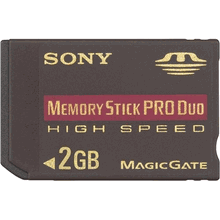
2GB High Speed Memory Stick


Maximize the storage of your compact digital device with the MSX-M2GN High Speed Memory Stick PRO Duo media from Sony.2 GB maximum storage capacity with 1.85 GB available
Designed to support Read and write speeds up to 80 Mbps on high speed enabled devices
Increased durability with an operating temperature range of -13 F to 185 FMaximize the storage of your compact digital device with the MSX-M2GN High Speed Memory Stick PRO Duo media from Sony.
With a massive total storage capacity of 2 gigabytes and an available capacity of 1.85 gygabytes, it is perfect for storing photographs, video, and digital music files. Its high speed feature allows it to read and write data at speeds up to 80 megabits per second on enabled devices.
The MSX-M2GN is backwards compatible with many devices that use standard Memory Stick PRO Duo media . With the included MSAC-M2 adaptor it can be used with most products that support full-sized Memory Stick PRO media .
It's the perfect complement to your new digital camera, camcorder, or PSP?Handheld Entertainment System.2 GB storage capacity with 1.85 GB available Designed to support read and write speeds of 80 Mbps on high speed enabled devices Operating temperature range of -13F to 185F allows greater durability Backwards compatible with devices that use Memory Stick PRO Duo media Included MSAC-M2 adaptor allows compatibility with Memory Stick PRO media enabled devices Designed especially for professional-quality compact digital cameras and portable digital music devices
Oringin post from..............

Wednesday, February 22, 2006

Sony Playstation Portable (PSP)


Advantages:
wicked does everthing
Disadvantages:
except its not a phone
Recommend to potential buyers:
yes
Full review
You've probably done a lot of research and read reviews already, so I'll just keep this short and hit the highlights. - The screen: Yeah, it's nice. I have no dead pixels. - The games: A little skimpy right now, but I can easily imagine REALLY good ones coming to this platform. If you can live without a PSP for a while, you may want to wait for the good stuff. I haven't tried any multiplayer games yet, but I'm looking forward to it. - The video player: VERY nice. The Spiderman 2 movie looks fantastic. The movies are a little skimpy right now too, but if rental places (Blockbuster, airport stores...) start carrying lots of titles and new releases, the device is worth the purchase as a portable movie player alone. I hope there are plans for making UMD-R/RWs, because the memory stick is not yet practical for day-to-day storage of your own stuff. - The MP3 player: More bulky than most that are out these days, but good enough. It's a nice extra feature, but don't buy it for this functionality alone. (Is anyone anyway?) The included remote is handy. - The geek features: USB connectivity is kind of slow, but that's probably because of USB, not the PSP. I had a little trouble connecting to my Linksys wireless router. I had to assign an IP address because it wouldn't get a DHCP address automagically. Speaking of wireless, it SURE would be nice to be able to move files back and forth using a wireless network instead of USB, but I don't think this functionality exists (yet). Haven't used the IR port yet, don't know what it's good for since USB connectivity is included. Also, there are already hacks to make the PSP a Web browser and IRC client. This functionality was already built in, which tells me that Sony has plans for more functionality coming down the pipeline. - Spiffiness: Very. They put a lot of thought into the design of this device, and I think it really paid off. I appreciate little things like the button to disable the wireless and the switch to disable all of the buttons (for watching movies or listening to mp3s) except the remote buttons. I wish the case were a little more ergonomic, but with the right grippie/protector, it's fine. - What you'll need in addition: 1) A bigger memory card. For it to be useful at all, you'll want at least 256MB. I would recommend at least 512MB, but they're curiously hard to find anywhere now. 32MB just plain sucks. 2) Some sort of screen/unit protection, such as the rubber cover. You do NOT want that screen to get scratched! 3) Some games. It comes with none. I don't like the bundles that everyone is selling, because there's no discount. (Add up the price of the bundle and compare it with the prices of the separate items...) I suggest getting the Value Pack and picking your own games and accessories. 4) A carrying case and some UMD disc cases would be nice, otherwise they'll get scattered all about. The games and movies do NOT come with a protective case, so unless you plan on ALWAYS returning the disks to their almost DVD box-sized boxes, you'll need something to keep the discs from getting scratched. If you're the kind of person who has to have a PSP now, I think you'll thoroughly enjoy it. If you're not, then don't let all the hype change your mind. It solidly earns four out of five stars right now, and as more games and movies are released, that rating will crawl towards five. If you're somewhat interested in buying one, though, I do think you'll eventually get one because it is a lot of fun and quite useful. Hopefully this will help in your purchasing decision!

http://www.ciao.co.uk/Sony_Playstation_Portable_PSP__Review_5561690

Tuesday, February 21, 2006

Figure skating: Navka, Kostomarov keep Russian run alive »


Tatiana Navka and Roman Kostomarov seized the ice dance gold medal on Monday to keep alive Russia's chances of sweeping all four figure skating titles at the Winter Olympics. Navka and Kostomarov edged out Americans Tanith Belbin and Benjamin Agosto by 4.58 points with their sultry Carmen Suite performance. Ukrainian husband-and-wife team Elena Grushina and Ruslan Goncharov finished third with a combined total of 195.85. Navka and Kostomarov gave Russia their third title at the Palavela rink after Tatiana Totmianina and Maxim Marinin...

http://www.torino2006.org/ENG/OlympicGames/news/news_eng161702.html

Monday, February 20, 2006

Bobsleigh: Germany’s Great Gold. Canada and Switzerland on the Podium »


The Olympic two man bobsleigh title has stayed in Germany. In Salt Lake City Christoph Langen and Markus Zimmermann had won, in Cesana Pariol they were imitated by Andre Lange and Kevin Kuske. Under a thick snowfall, the two Germans got their second Olympic gold, after the won in the Four Man bob in 2002. The turnaround for the second day was their third heat in which the 33-year-old from Ilmenau and the 27-year-old from Potsdam...
http://www.torino2006.org/ENG/OlympicGames/news/news_eng161607.html