Monday, February 23, 2009

YouTube Downloader 2.1.7

This simple freeware application works pretty well, given how basic the interface is. It has two main features: to download FLV files from YouTube, and to convert them to most major formats. If there's a YouTube URL in your clipboard, it will automatically paste it for you when you click on the dialog box. From there, just hit OK and the downloading will commence. One more left-click is all it takes to load the file in the converter, which supports iPhone, iPod, PSP, cell phone, AVI, MP3, WMV, and Xvid. Surprisingly, there's also a basic video editor for cropping videos by time stamp. You can also cut out the sound when converting.

This is one of the lightest editors around, but the simplistic interface belies its functionality and it performs exactly as advertised. We'd like to see support in future editions for hunting down missing codecs, and version 2.1.5 and earlier won't work because of embed code changes on YouTube itself. Still, the YouTube Downloader is proof that not only is video-making accessible to everyone, so is video downloading and editin
Download : http://www.download.com/YouTube-Downloader/3000-2071_4-10647340.html?cdlPid=10981496

AVG Anti-Virus Free Edition

From AVG Technologies USA:

AVG Free Edition is the well-known antivirus protection tool. AVG Free is available free of charge to home users for the life of the product. Rapid virus database updates are available for the lifetime of the product, thereby providing the high level of detection capability that millions of users around the world trust to protect their computers. AVG Free is easy to use and will not slow your system down (low system resource requirements. Highlights include automatic update functionality, the AVG Resident Shield, which provides real-time protection as files are opened and programs are run, free Virus Database Updates for the lifetime of the product, and AVG Virus Vault for safe handling of infected files.

Version 8.0.237 may include unspecified updates, enhancements, or bug fixes.

See more CNET content tagged:
AVG,
AVG Anti-Virus,
Automatic Update,
antivirus,
virus


Editor's review of AVG Anti-Virus Free Edition

  • 5.0 stars

  • "Don't get burned"

This antivirus program offers rock-solid protection. AVG Free provides the bare necessities, including a real-time shield to prevent infections, anti-virus and anti-malware wrapped up in one engine, and a link scanner for Web surfing with care.

By default, the application is set to search for new virus definitions daily, but you always can use the scheduling tool to change this. Should a virus create serious system problems, AVG creates a rescue disk to scan your computer in MS-DOS mode. The program doesn't tax your system when scanning or when running in the background and always proved effective in our tests. The new interface is much easier to navigate than in previous version, with tabbed navigation on the left assisting users in drilling down to the tools they need.

Though the free version of this program will suffice for average folks, those who demand more control should certainly consider AVG Anti-Virus Professional.


Download : http://www.download.com/AVG-Anti-Virus-Free-Edition/3000-2239_4-10320142.html?tag=contentBody;mostPopTwoColWrap&cdlPid=11006019

Friday, November 09, 2007

5 ways to speed up your PC

By following a few simple guidelines, you can maintain your computer and keep it running smoothly. This article discusses how to use the tools available in Windows XP Service Pack 2 (SP2) and Windows Vista to more efficiently maintain your computer and safeguard your privacy when you're online.
Free up disk space
By freeing disk space, you can improve the performance of your computer. The Disk Cleanup tool helps you free up space on your hard disk. The utility identifies files that you can safely delete, and then enables you to choose whether you want to delete some or all of the identified files.Use Disk Cleanup to:

Remove temporary Internet files.

Remove downloaded program files (such as Microsoft ActiveX controls and Java applets).

Empty the Recycle Bin.

Remove Windows temporary files.

Remove optional Windows components that you don't use.

Remove installed programs that you no longer use.
Tip: Typically, temporary Internet files take the most amount of space because the browser caches each page you visit for faster access later.
To use Disk Cleanup
1.
Click Start, point to All Programs, point to Accessories, point to System Tools, and then click Disk Cleanup. If several drives are available, you might be prompted to specify which drive you want to clean.
2.
In the Disk Cleanup for dialog box, scroll through the content of the Files to delete list.
Choose the files that you want to delete.
3.
Clear the check boxes for files that you don't want to delete, and then click OK.
4.
When prompted to confirm that you want to delete the specified files, click Yes.
After a few minutes, the process completes and the Disk Cleanup dialog box closes, leaving your computer cleaner and performing better.

Speed up access to data
Disk fragmentation slows the overall performance of your system. When files are fragmented, the computer must search the hard disk when the file is opened to piece it back together. The response time can be significantly longer.
Disk Defragmenter is a Windows utility that consolidates fragmented files and folders on your computer's hard disk so that each occupies a single space on the disk. With your files stored neatly end-to-end, without fragmentation, reading and writing to the disk speeds up.
When to run Disk DefragmenterIn addition to running Disk Defragmenter at regular intervals—monthly is optimal—there are other times you should run it too, such as when:

You add a large number of files.

Your free disk space totals 15 percent or less.

You install new programs or a new version of Windows.
To use Disk Defragmenter:
1.
Click Start, point to All Programs, point to Accessories, point to System Tools, and then click Disk Defragmenter.
Click Analyze to start the Disk Defragmenter.
2.
In the Disk Defragmenter dialog box, click the drives that you want to defragment, and then click the Analyze button. After the disk is analyzed, a dialog box appears, letting you know whether you should defragment the analyzed drives.
Tip: You should analyze a volume before defragmenting it to get an estimate of how long the defragmentation process will take.
3.
To defragment the selected drive or drives, click the Defragment button. Note: In Windows Vista, there is no graphical user interface to demonstrate the progress—but your hard drive is still being defragmented.
After the defragmentation is complete, Disk Defragmenter displays the results.
4.
To display detailed information about the defragmented disk or partition, click View Report.
5.
To close the View Report dialog box, click Close.
6.
To close the Disk Defragmenter utility, click the Close button on the title bar of the window.

Detect and repair disk errors
In addition to running Disk Cleanup and Disk Defragmenter to optimize the performance of your computer, you can check the integrity of the files stored on your hard disk by running the Error Checking utility.
As you use your hard drive, it can develop bad sectors. Bad sectors slow down hard disk performance and sometimes make data writing (such as file saving) difficult, or even impossible. The Error Checking utility scans the hard drive for bad sectors, and scans for file system errors to see whether certain files or folders are misplaced.
If you use your computer daily, you should run this utility once a week to help prevent data loss.
To run the Error Checking utility:
1.
Close all open files.
2.
Click Start, and then click My Computer.
3.
In the My Computer window, right-click the hard disk you want to search for bad sectors, and then click Properties.
4.
In the Properties dialog box, click the Tools tab.
5.
Click the Check Now button.
6.
In the Check Disk dialog box, select the Scan for and attempt recovery of bad sectors check box, and then click Start.
7.
If bad sectors are found, choose to fix them.
Tip: Only select the "Automatically fix file system errors" check box if you think that your disk contains bad sectors.
Protect your computer against spyware
Spyware collects personal information without letting you know and without asking for permission. From the Web sites you visit to usernames and passwords, spyware can put you and your confidential information at risk. In addition to privacy concerns, spyware can hamper your computer's performance. To combat spyware, you might want to consider using Microsoft Windows Defender, which is included in Windows Vista, and is available as a free download for Microsoft XP SP2. Alternatively, there are other free anti-spyware software programs available.
Learn all about ReadyBoost
If you're using Windows Vista, you can use ReadyBoost to speed up your system. A new concept in adding memory to a system, it allows you to use non-volatile flash memory—like a USB flash drive or a memory card—to improve performance without having to add additional memory. Learn more.

Friday, December 29, 2006

Download New Office Accounting Software for Free


Save time, get organized, and build your small or home-based business with Microsoft Office Accounting Express 2007. Download it for free today.

Thursday, December 28, 2006

Prepare For Second Wave Of Floods, Says Najib

KUANTAN, Dec 28 (Bernama) -- Deputy Prime Minister Datuk Seri Najib Tun Razak wants all government departments and agencies including rescue teams to brace themselves for the second wave of floods.

Thursday, May 04, 2006

about Internet Explorer 7


Got a minute? Get familiar with the improvements made to Internet Explorer 7 that can help make your everyday tasks easier.

Windows® Defender (Beta 2) x86


Windows Defender (Beta 2) is a free program that helps you stay productive by protecting your computer against pop-ups, slow performance and security threats caused by spyware and other potentially unwanted software.
System Requirements
Supported Operating Systems: Windows 2000 Service Pack 4; Windows Server 2003 Service Pack 1; Windows XP Service Pack 2
For more details, see the
System Requirements page.

Thursday, February 23, 2006

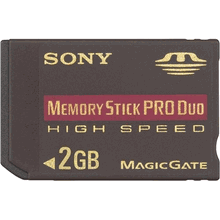
2GB High Speed Memory Stick


Maximize the storage of your compact digital device with the MSX-M2GN High Speed Memory Stick PRO Duo media from Sony.2 GB maximum storage capacity with 1.85 GB available
Designed to support Read and write speeds up to 80 Mbps on high speed enabled devices
Increased durability with an operating temperature range of -13 F to 185 FMaximize the storage of your compact digital device with the MSX-M2GN High Speed Memory Stick PRO Duo media from Sony.
With a massive total storage capacity of 2 gigabytes and an available capacity of 1.85 gygabytes, it is perfect for storing photographs, video, and digital music files. Its high speed feature allows it to read and write data at speeds up to 80 megabits per second on enabled devices.
The MSX-M2GN is backwards compatible with many devices that use standard Memory Stick PRO Duo media . With the included MSAC-M2 adaptor it can be used with most products that support full-sized Memory Stick PRO media .
It's the perfect complement to your new digital camera, camcorder, or PSP?Handheld Entertainment System.2 GB storage capacity with 1.85 GB available Designed to support read and write speeds of 80 Mbps on high speed enabled devices Operating temperature range of -13F to 185F allows greater durability Backwards compatible with devices that use Memory Stick PRO Duo media Included MSAC-M2 adaptor allows compatibility with Memory Stick PRO media enabled devices Designed especially for professional-quality compact digital cameras and portable digital music devices
Oringin post from..............

Wednesday, February 22, 2006

Sony Playstation Portable (PSP)


Advantages:
wicked does everthing
Disadvantages:
except its not a phone
Recommend to potential buyers:
yes
Full review
You've probably done a lot of research and read reviews already, so I'll just keep this short and hit the highlights. - The screen: Yeah, it's nice. I have no dead pixels. - The games: A little skimpy right now, but I can easily imagine REALLY good ones coming to this platform. If you can live without a PSP for a while, you may want to wait for the good stuff. I haven't tried any multiplayer games yet, but I'm looking forward to it. - The video player: VERY nice. The Spiderman 2 movie looks fantastic. The movies are a little skimpy right now too, but if rental places (Blockbuster, airport stores...) start carrying lots of titles and new releases, the device is worth the purchase as a portable movie player alone. I hope there are plans for making UMD-R/RWs, because the memory stick is not yet practical for day-to-day storage of your own stuff. - The MP3 player: More bulky than most that are out these days, but good enough. It's a nice extra feature, but don't buy it for this functionality alone. (Is anyone anyway?) The included remote is handy. - The geek features: USB connectivity is kind of slow, but that's probably because of USB, not the PSP. I had a little trouble connecting to my Linksys wireless router. I had to assign an IP address because it wouldn't get a DHCP address automagically. Speaking of wireless, it SURE would be nice to be able to move files back and forth using a wireless network instead of USB, but I don't think this functionality exists (yet). Haven't used the IR port yet, don't know what it's good for since USB connectivity is included. Also, there are already hacks to make the PSP a Web browser and IRC client. This functionality was already built in, which tells me that Sony has plans for more functionality coming down the pipeline. - Spiffiness: Very. They put a lot of thought into the design of this device, and I think it really paid off. I appreciate little things like the button to disable the wireless and the switch to disable all of the buttons (for watching movies or listening to mp3s) except the remote buttons. I wish the case were a little more ergonomic, but with the right grippie/protector, it's fine. - What you'll need in addition: 1) A bigger memory card. For it to be useful at all, you'll want at least 256MB. I would recommend at least 512MB, but they're curiously hard to find anywhere now. 32MB just plain sucks. 2) Some sort of screen/unit protection, such as the rubber cover. You do NOT want that screen to get scratched! 3) Some games. It comes with none. I don't like the bundles that everyone is selling, because there's no discount. (Add up the price of the bundle and compare it with the prices of the separate items...) I suggest getting the Value Pack and picking your own games and accessories. 4) A carrying case and some UMD disc cases would be nice, otherwise they'll get scattered all about. The games and movies do NOT come with a protective case, so unless you plan on ALWAYS returning the disks to their almost DVD box-sized boxes, you'll need something to keep the discs from getting scratched. If you're the kind of person who has to have a PSP now, I think you'll thoroughly enjoy it. If you're not, then don't let all the hype change your mind. It solidly earns four out of five stars right now, and as more games and movies are released, that rating will crawl towards five. If you're somewhat interested in buying one, though, I do think you'll eventually get one because it is a lot of fun and quite useful. Hopefully this will help in your purchasing decision!

http://www.ciao.co.uk/Sony_Playstation_Portable_PSP__Review_5561690

Tuesday, February 21, 2006

Figure skating: Navka, Kostomarov keep Russian run alive »


Tatiana Navka and Roman Kostomarov seized the ice dance gold medal on Monday to keep alive Russia's chances of sweeping all four figure skating titles at the Winter Olympics. Navka and Kostomarov edged out Americans Tanith Belbin and Benjamin Agosto by 4.58 points with their sultry Carmen Suite performance. Ukrainian husband-and-wife team Elena Grushina and Ruslan Goncharov finished third with a combined total of 195.85. Navka and Kostomarov gave Russia their third title at the Palavela rink after Tatiana Totmianina and Maxim Marinin...

http://www.torino2006.org/ENG/OlympicGames/news/news_eng161702.html

Monday, February 20, 2006

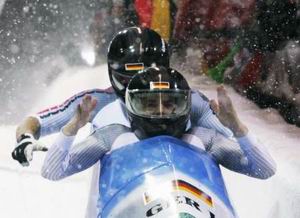
Bobsleigh: Germany’s Great Gold. Canada and Switzerland on the Podium »


The Olympic two man bobsleigh title has stayed in Germany. In Salt Lake City Christoph Langen and Markus Zimmermann had won, in Cesana Pariol they were imitated by Andre Lange and Kevin Kuske. Under a thick snowfall, the two Germans got their second Olympic gold, after the won in the Four Man bob in 2002. The turnaround for the second day was their third heat in which the 33-year-old from Ilmenau and the 27-year-old from Potsdam...
http://www.torino2006.org/ENG/OlympicGames/news/news_eng161607.html

Saturday, February 18, 2006

Ice Dancing: Fusar Poli and Margaglio in the Lead


Compulsory dance to the music of the Ravensburger Waltz started the Olympic ice dance competition on Friday evening. Home favourites Barbara Fusar Poli and Maurizio Margaglio took the lead with 38.78 points after this first phase in the competition. They returned to the competitions after the Olympic bronze won in Salt Lake City in 2002...
http://www.torino2006.org/ENG/OlympicGames/news/news_eng161398.html

Monday, February 13, 2006

Michael Greis’s individual


Michael Greis’s individual win 20 Km out of the way in the first biathlon in the XX Torino 2006 Olympic Winter Games, the spotlight is now on the women’s 15 Km. The favourite is the world cup leader, German flag bearer Kati Wilhelm. She is expected to confirm the absolute superiority she has shown in the races leading up to the Olympics though in a speciality in which she has not won yet.

http://www.torino2006.org/ENG/OlympicGames/news/news_eng160806.html

google2730b3b9bf5bf48e

computer wallpaper

Saturday, February 11, 2006

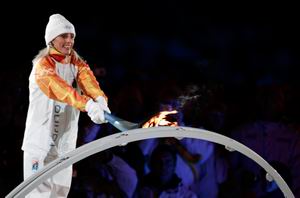
A Show for the Opening of the XX Torino 2006 Olympic Winter Games »


Stefania Belmondo © ReutersThe Torino 2006 Olympic Winter Games have officially started. They were sanctioned by the President of the Republic Carlo Azeglio Ciampi, with his words addressed to athletes, technicians and spectators: “I declare the celebration of the Torino 2006 XX Olympic Winter Games officially

http://www.torino2006.org/ENG/OlympicGames/home/index.html

Thursday, February 09, 2006

Healthful Tips

Snacking on foods that boosts the immune system ( like fruits and vegetables) is important in keeping the nasty Potentially Pathogenic Bacteria(PPB) at bay.

yschia@walla.com
www.dxn2u.com
www.unet2u.com

Wednesday, February 08, 2006

Saturday, February 04, 2006

Nokia N90 series

Technical Specifications:

Operating frequency
Dual mode WCDMA/GSM and triband GSM coverage on up to five continents (GSM 900/1800/1900 and WCDMA 2100 networks)
Automatic switching between bands and modes

Usage Modes
Imaging mode
Camera mode
Fold open mode
Fold closed mode


Dimensions
Volume: 126cc
Weight: 173g
Length: 112mm
Width (max): 51mm
Thickness (max): 24mm


Display and User Interface:

Active matrix 65,536 colour cover display (128 x 128 pixels)
2.1 inch active matrix 262,144 colour main display (352 x 416 pixels)
Automatic brightness control for main display
Five-way scroll key, two soft keys, application key, edit and clear keys, send and end keys, additional softkeys for landscape mode
Dedicated key for voice dialling and voice commands
Active standby screen
Side joystick
Dedicated key for image capture and video record

Imaging and Video
Two-way video call capability
Video sharing for one-way live video or video clip sharing within the voice call
2 megapixel camera (1600 x 1200 pixels) with autofocus 20x digital zoom
Integrated flash (operating range up to 1.5m)
Flash modes: on, off, automatic and anti red-eye
Video capturing in MP4 format (MPEG-4 video, AAC-LC audio) CIF resolution (352x288 pixels)
Advanced camera modes: still, sequence, video
Settings for brightness adjustment, image quality, self-timer, white balance settings and colour tones
Six possible capture scene settings including Scenery, Portrait, Night and Sports
Video and still image editors
Movie Director for automated video production
Image and video clip uploading to the web
Rotating gallery

Nokia XpressPrint Printing Solution

Print digital photos directly from the device:
Transfer photos directly to compatible printer or kiosk via Bluetooth wireless technology, MultiMediaCard (MMC) or to PictBridge-compliant printer via USB cable
Built-in application is quick and easy to use; no installation, no fuss
Find out more at www.nokia.com/xpressprint

RealPlayer Media Player

Download and play multimedia files (video and music)
Stream media files from compatible media portals
Full-screen video playback on the phone to view downloaded, streamed or recorded video clips in larger size
Played formats (decoding): MP3, AAC, Real Audio, WAV, Nokia Ring Tones, AMR, AMR-WB, AMR-NB, AU, MIDI, H.263, JPEG, JPEG2000, EXIF 2.2, GIF 87/89, PNG, BMP (W-BMP), MBM and MPEG-4

Memory Functions

Up to 27 MB of internal dynamic memory for contacts, text messages, multimedia messages, ringing tones, images, video clips, calendar notes, to-do list and applications
Expandable memory: 64 MB Reduced Size Dual Voltage (1.8/3V) MultiMediaCard (MMC)*
Hot swap slot for easy MMC card insertion and removal

Note: The built in MultiMediaCard (MMC) reader in the Nokia N90 functions on 1.8 Volt and therefore requires a dual voltage MMC which can support both 1.8V and 3.0V. Nokia branded MultiMediaCards (MMC) are dual voltage cards (sold separately).

*Please note that the memory capacity of the MultiMediaCard (MMC) in the sales package may vary depending on the market and/or your network operator/service provider.

Messaging

Convenient push email client with attachment support (view jpg, 3gp, MP3, .ppt, .doc, excel and .pdf files) and periodic polling functionality
Compatible with Nokia Wireless Keyboard (sold separately)
Multimedia messaging: combine image, video, text, and audio clip and send as MMS to a compatible phone or PC; use MMS to tell your story with a multi-slide presentation
Automatic resizing of your megapixel images to fit MMS (max. 300 KB attachment size depending on the network)
Text messaging: supports concatenated SMS, picture messaging, SMS distribution list
Predictive text input: support for all major languages in Europe and Asia-Pacific
Instant Messaging

Connectivity

Integrated Bluetooth wireless technology v.1.2
USB 2.0 full speed via Pop-Port™ interface
Nokia PC Suite connectivity with USB and Bluetooth wireless technology
Local synchronisation of contacts and calendar to a compatible PC using compatible connection
Remote over-the-air synchronisation
Send and receive images, video clips, graphics, and business cards via Bluetooth wireless technology
Profiles with Bluetooth connectivity: Basic Printing Profile (BPP) using Image Print or Info Print applications, Human Interface Device Profile (HID) using Nokia Wireless Keyboard application

Browsing

WAP 2.0 XHTML/HTML multimode browser
Improved Web compatibility with support for HTML 4.01, including support for elements such as image maps, background images, and frames
Support for a subset of JavaScript 1.5, which includes the most commonly used functions found on the Internet
File upload over HTTP using standard HTML forms
Small screen rendering option including a faster page-up/page-down scrolling style
Full-screen mode, download progress bar, and adaptive history list
3GPP video streaming
OMA DRM 1.0 - including forward lock for content protection, combined delivery, separate delivery and superdistribution
Offline mode for using imaging and productivity features in areas where the radio must be switched off

Data Transfer

WCDMA 2100 with simultaneous voice and packet data (PS max speed UL/DL= 128/384kbps, CS max speed 64kpbs)

EGPRS, class B, multislot class 10


Speech codecs: FR, EFR, WCDMA, and GSM AMR
Transfer data from one Series 60 phone to another

Call Management

Push to talk (PoC)
Contacts: advanced contacts database with support for multiple phone and email details per entry, also supports thumbnail pictures and groups
Speed dialling
Logs: keeps lists of your dialed, received, and missed calls
Automatic redial
Automatic answer (works with compatible headset or car kit only)
Supports Fixed Dialling Number, which allows calls only to predefined numbers
Conference call

Java Applications

Java™ MIDP 2.0, CLDC 1.1 (Connected Limited Device Configuration (J2ME))
Over-the-air download of Java™-based applications and games

Other Applications

Personal Information Management (PIM)

Advanced Series 60 PIM features including calendar, contacts, to-do list, and PIM printing

Enhanced Voice Features

Speaker Independent Name Dialling (SIND)
Voice commands
Voice recorder
Integrated handsfree speaker

Digital Services

Java™ and Symbian applications available from Nokia Software Market
Graphics, icons, animations, logos
Games: Possibility to download new games
Ringing tones: True Tones, polyphonic tones
Themes: Possibility to download new themes

Sales Package Contents

Nokia N90
64MB MultiMediaCard (MMC) MU-1*
Adapter for normal size MMC slots
Nokia Stereo Headset HDS-3 (HS-3 in APAC)
Nokia Battery BL-5B
Nokia Travel Charger AC-4
Adapter for Nokia ACP-12 charger
Nokia Connectivity Cable (USB) CA-53
CD-ROM containing software
User guide, Quick Start guide, and Add-on Application guide

* Please note different MultiMediaCard (MMC) configurations may be available depending on country or operator configuration

Power Management

Battery: Lithium Ion Battery 760mAh BL-5B
Talk Time: Up to 3 hrs*
Stand-by Time: Up to 12 days*

Certification Information (SAR)

天然的好帮手--酵素

天然的好帮手--酵素

2005年01月04日 林光常

在北美居住的华人,对于西方饮食文化中会有一道生菜沙拉,想必并不陌生;但对于林光常博士所提倡的排毒餐中,亦主张就蔬菜的部份进行生食,则不免困惑?其实不单只是为了保存蔬菜营养的完整性,重要的是使食物中所含的酵素不被破坏。

「酵素」不是细胞,而是比细胞单位更小的一种蛋白质,举凡细胞的代谢、新生、分解、消化......等等,都少不了它。或许您不知道?有酵素才有生命;没有酵素则意谓着生命即将步向死亡。也正因为酵素在身体内部扮演着不可或缺的角色,所以身体中酵素的多寡与其运作情形,和人体的青春、健康、老化及疾病息息相关。举例而言,糖尿病是因为胰脏分泌胰岛素的功能失调或丧失所导致。因此有许多的糖尿病患者,在服用酵素之后,糖尿病的症状可以获得很大的控制与改善。除此之外,酵素还具有杀菌、抗炎的作用,所以有感冒、发烧、喉咙发炎......等症状的病人服用之后,症状大多可以减轻甚至痊愈。

「酵素」不同于成药,它让疾病症状获得改善,是因为它藉由帮助提升自身的免疫系统功能,让身体不适的症状完全耗发出来,而不是将症状压抑下去,所以非但不会有副作用,甚至能进一步的帮助体质改善。不仅如此,酵素还具有净化血液、分解与排除毒素、使血液成为弱碱性的功效,因此肝功能欠佳及容易感到疲劳的人,服用酵素不失为一种固肝的好方法。再者,酵素可帮助进行细胞内的分解作用,故对于肠胃道功能虚弱或有障碍者,如:胀气、胃痛、腹泻、便秘等症状,都可使之得到改善。然而针对因新陈代谢迟缓而导致的肥胖者,则可借着酵素活化细胞、促进新陈代谢的作用来达到减重的功效。

许多癌症患者为能够及时快速的调整疾病体质,服用酵素亦是很好的方法。也有许多癌症病人在化疗期间,因副作用强烈而非常难受,透过酵素的作用,可以舒缓副作用造成的不适,使其症状减轻。

酵素,对许多人来说还处于陌生阶段,一般而言,对于服用维他命,大家觉得或许还有些道理,因为那是供应身体营养素的来源,虽然酵素不能提供营养素,但这些营养素,若没有酵素的运作,帮助其分解、消化、吸收,也等于是英雄无用武之地!可见酵素扮演着比维他命更重要的角色,也有人这样的怀疑,既然身体各器官可以自行分泌酵素,我们为什么还要另外补充呢?况且这样的补充是否会干扰体内酵素的分泌功能?就好比家中常开的汽车,我们必须要有定期的保养与维修。而对于体内的各器官保养与维修,那就必须依靠酵素了,因为每一个人体内组织的酵素库存量是固定的,这时若有外来酵素的帮忙,就能防止体内酵素的快速流失,因此,不但不会干扰器官分泌系统的作用,反而是有助益的,减少器官因过度使用而导致身体新陈代谢异常或免疫功能降低。

再举一例,有人因为长期情绪紧张,而导致胃在分泌消化?(酵素亦称?)时失衡,引起胃酸过多,严重时产生心灼热(Heart burn),一般人多半是用制酸剂或胃乳来控制此情形,可是长期服用制酸剂会有心肌功能异常的副作用,一旦停止服用制酸剂时,胃部症状又会出现,因此常陷入两难的情况,若改服用酵素,则因为有酵素的帮助,使食物进入胃中与酵素做结合,因此减少对胃壁的刺激,相对地也就减轻过多的胃酸分泌,心灼热的情形也就不再有了。

当然,慎选酵素才能达到既健康又改善症状的效果,由于一般市面上的酵素,为了迎合白人大量摄取肉食的情况,其分解蛋白质的酵素比例过高,这样的酵素是不适合亚洲人的饮食结构,因此有胃酸毛病的人,任意在货架上取了一瓶酵素服用,不但无法改善胃酸问题,反而会有恶心等不适感。而本中心所推荐之酵素,系日本进口且经过「无毒一身轻」作者林光常博士,经由临床上的试验,不仅对癌症病人在体质调整上有帮助,即使是健康人,亦是很好的补充品,其复方搭配(除了木瓜酵素、菠萝酵素之外,再加上人蔘酵素、曲类、菇类、芝麻酵素),能均衡地顾及身体需要,而对于容易失眠者,服用本酵素,亦能有助眠的功效。谢谢您耐心的阅读,希望这篇文章能为您们打开健康大门,下一期将介绍心血管疾病、高血压的克星-纳豆酵素。

Get your laters Malaysia C.P.A EA Form

Times to report our income to Hasil malaysia... did u all wokers already summitted it ? those don't know what it is ?? here got to this web site to check it out http://www.hasilnet.org.my